
Best Budget Standing Desk (2026): What the Specs Actually Say
Some links here are affiliate links. If you buy through one, I may earn a commission at no extra cost to you. I only recommend desks I have checked against manufacturer specs, and no brand pays for placement.
The first thing to check on a budget standing desk is not how high it goes.
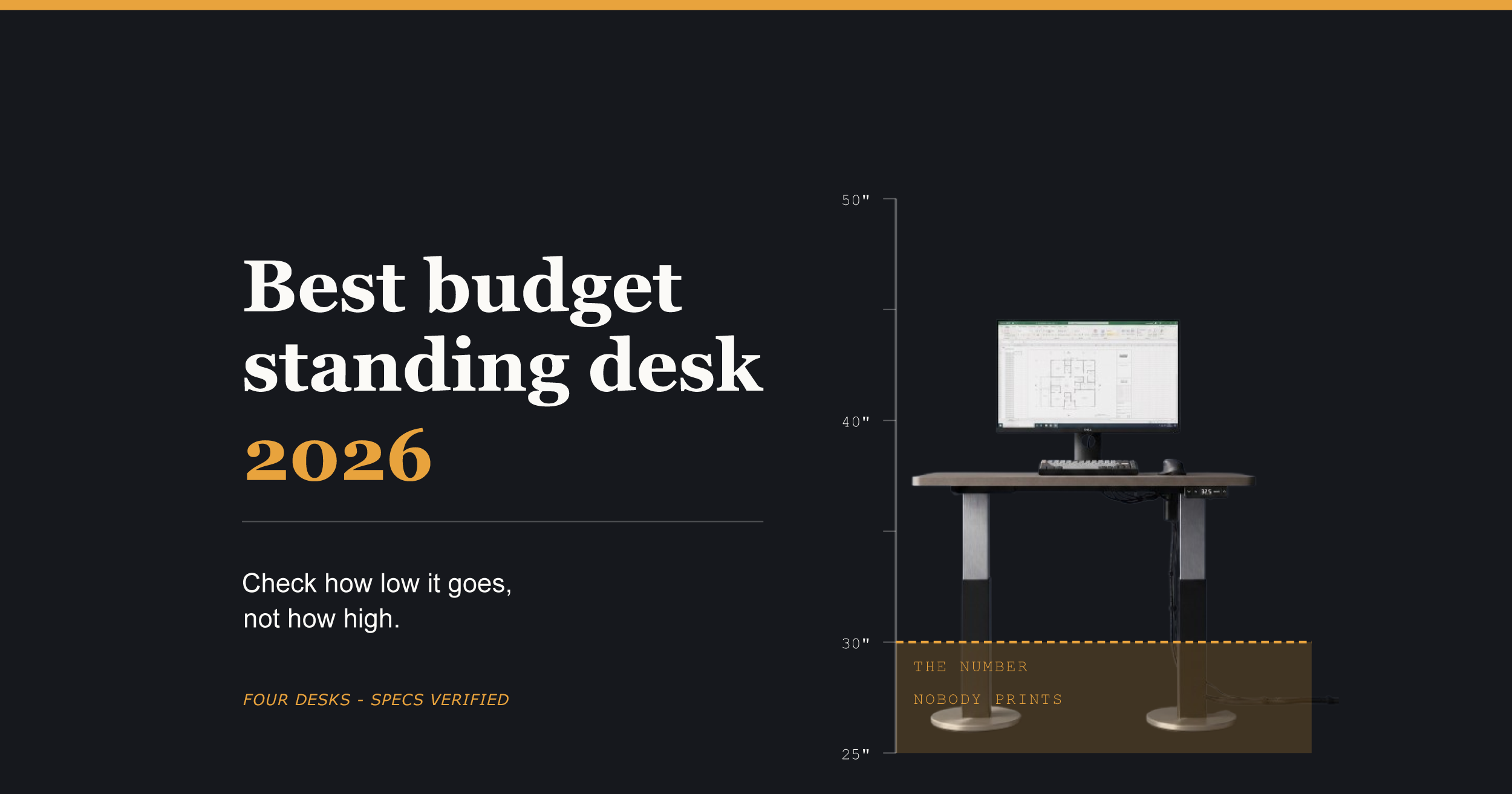
Every review leads with the standing height. The photos all show someone upright at their desk looking pleased about it. But you will spend most of your day sitting, and the number that decides whether you can do that comfortably is the one at the bottom of the range. Almost nobody publishes it prominently, and three of the five desks I vetted cannot go low enough for a shorter person to sit at properly.
I went through five budget desks against manufacturer spec pages, retailer listings and published spec sheets, then read 53 negative owner reviews to see what goes wrong after delivery. Along the way I found that two popular picks are the same desk with different keypads, that one model has two different capacities published on its maker’s own site, that the desk most often praised for its warranty has the shortest one here, and that half of all complaints about these desks are about getting them built.
If you want the reasoning, it starts below the table. If you just want the desk, here it is.
The picks at a glance.
Four desks · Specs verified
The picks at a glance
| Desk | Best for | Price checkpoint |
|---|---|---|
| FlexiSpot E6Best on this page | Almost everyone, especially under 5’6″ or over 6’0″ | $275–$300 complete, frame only $189–$200 |
| FlexiSpot E2 (Essential) | Spending as little as possible on a normal setup | From $187 |
| FlexiSpot EN1 | People who switch positions several times a day | Has sold under $150 on promotion |
| Vari Essential 48×24 | Buyers who want independent BIFMA testing | $399.99 list, has sold at $299.99 |
One brand I looked at and left off entirely is Fezibo, and the reason is covered in Buy the listing, not the model name.
The height trap
This is the one that catches people, and I suspect it catches more of them than motor count ever will.
Every review talks about how high a standing desk goes. Almost none of them talk about how low it goes, which is strange, because you will spend most of your day sitting at it.
Standard seated desk height in the US is 29 to 30 inches. That number was not chosen for you. Haworth puts it plainly: 29 to 30 inches suits people between 5’8″ and 6’0″. If you fall outside that band, a standard desk was never going to fit, and a lot of people buy a standing desk specifically to fix that.
So check what these desks do at the bottom.
Where these desks bottom out
| Desk | Frame minimum | Desktop | Working minimum |
|---|---|---|---|
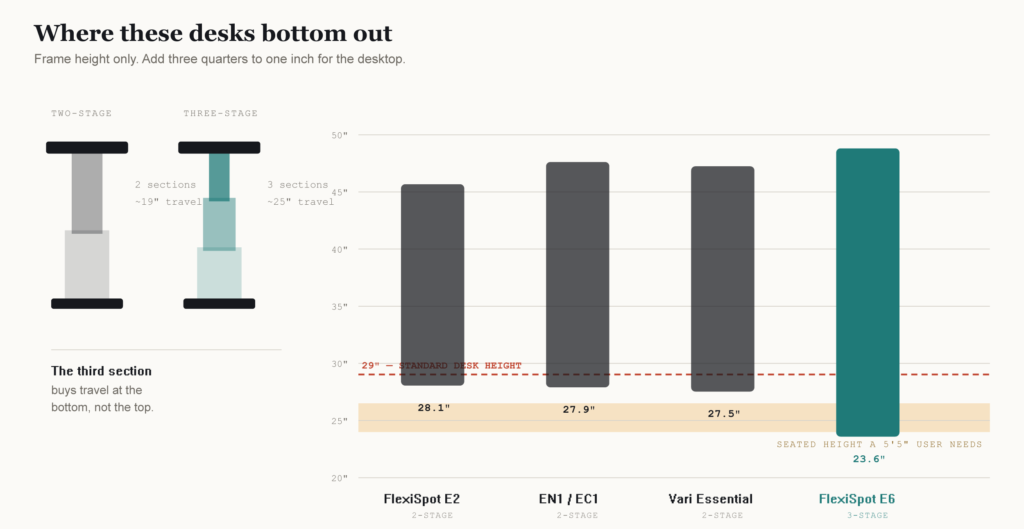
| FlexiSpot E2 (42″ wide) | 28.1″ | 1″ | 29.1″ |
| FlexiSpot EN1 / EC1 | 27.9″ | 1″ | 28.9″ |
| Vari Essential | not published | 0.75″ | 27.5″ |
| FlexiSpot E6 | 23.6″ | 1″ (0.7″ bamboo) | ~24.6″ |
| Working minimum is the height of the desk surface you actually sit at, frame plus desktop. It is the number no product page prints. FlexiSpot quotes frame height, so I add the top. Vari quotes desk height already, so 27.5″ is the surface as sold. A 5’5″ user needs roughly 24 to 26.5″, which only the three-stage E6 reaches. | |||
That last column is the one that matters, and you will not find it on any product page, because the two brands do not measure the same thing. FlexiSpot prints frame height and says so. Vari prints “Desk Max Height” and quotes the surface. Put their numbers side by side without adjusting and you are comparing a desk to a pair of legs.
Three of these four bottom out at or just under standard desk height. If you are 5’5″, the seated height you want is somewhere around 24 to 26.5 inches by the common ergonomic formula. The EN1 will not get within two inches of that. Neither will the E2. You would be buying an adjustable desk that cannot adjust to the position you sit in all day.
The E6 is the outlier, and the reason is the one spec nobody lists. It has three-stage legs instead of two. A third telescoping section buys almost six extra inches of travel in the same footprint, and nearly all of it lands at the bottom of the range.
The tall end is less dramatic but worth checking. Standing elbow height runs roughly 60 to 63 percent of your total height, and the desk wants to sit an inch or two below your elbow. At 6’2″ that puts you around 43 to 44 inches, which every desk here clears. Where tall users run into trouble is if they want headroom above that, or if they wear thick-soled shoes at the desk, which adds directly to the number.
The practical move. Take your height in inches, halve it, subtract 8.5. That is roughly your seated desk height. Then check it against the lowest number in the table, plus an inch for the desktop. If your figure is below the desk’s floor, no amount of chair adjustment fixes it properly. You end up with your knees riding high and your shoulders creeping toward your ears by mid-afternoon.
Under about 5’6″, the low end is your constraint and you probably want three-stage legs. Between 5’6″ and 6’0″, almost anything here works and you can spend the savings elsewhere. Over 6’0″, check the maximum against your standing elbow height and remember to add your shoes.
Where these desks actually go wrong
Height is what stops a desk fitting you. This is what goes wrong after it arrives.
I read 53 one, two and three-star reviews across the FlexiSpot EN1 and the now-discontinued EN2 on Amazon, dated from 2020 through July 2026, plus four r/StandingDesk threads from the past year. One caveat on the numbers. Amazon sorts reviews by helpfulness rather than at random, so these are proportions among the reviews Amazon puts in front of you, not a clean sample.
Half of the complaints are about assembly. Twenty-six of the 53. Not the desk failing, not the motor dying. Getting the thing built. The specific failure is the drive rod, and the mechanics section below explains why. One owner spells it out for everyone else: push the transmission rod fully into the hole until the ring sits flush, because plenty of people have not seated it properly on the motor side. Two more describe legs that ended up at mismatched heights, which is the same problem seen from the other end. Others report missing pre-drilled holes, screws that seize halfway, and instructions that skip steps.
If you buy a single-motor desk, budget an hour rather than twenty minutes, and get a second person for the frame flip.
Height regret comes second, at nine mentions, and this is where owners are quietly doing better research than the roundups. Two of them worked out the frame-versus-desktop gap on their own. One notes that the mechanism bottoms out at 28 inches, the supplied top adds an inch, and the result is too tall to sit at if you are 5’4″ or under. Another bought on an advertised 28.1 inches and measured 30 once assembled. A third wrote a whole review about the desk being too tall at its lowest setting when used with a chair. Three separate buyers, three separate desks, all arriving at the thing I needed three verification passes to pin down. Nobody publishing a roundup mentions it.
Wobble, motor failure and electronics failure all land around nine, nine and six. Roughly even. Some reviews raise more than one problem, which is why the category counts add up past 53. I went in expecting electronics to dominate, since FlexiSpot warranties the controller for two years against five on the motor, and that turned out not to hold.
One report is worth reading twice. An EN2 owner had the electronics last five years, then found the model discontinued with no replacement parts available. A five-year warranty assumes the product line still exists in year five.
The mechanics: what one motor buys you
Every roundup tells you dual motor beats single motor. True, and mostly beside the point down here, because below roughly $200 there is no dual-motor option worth having. Four of the five desks on this page are single-motor, including the ones those same roundups recommend.
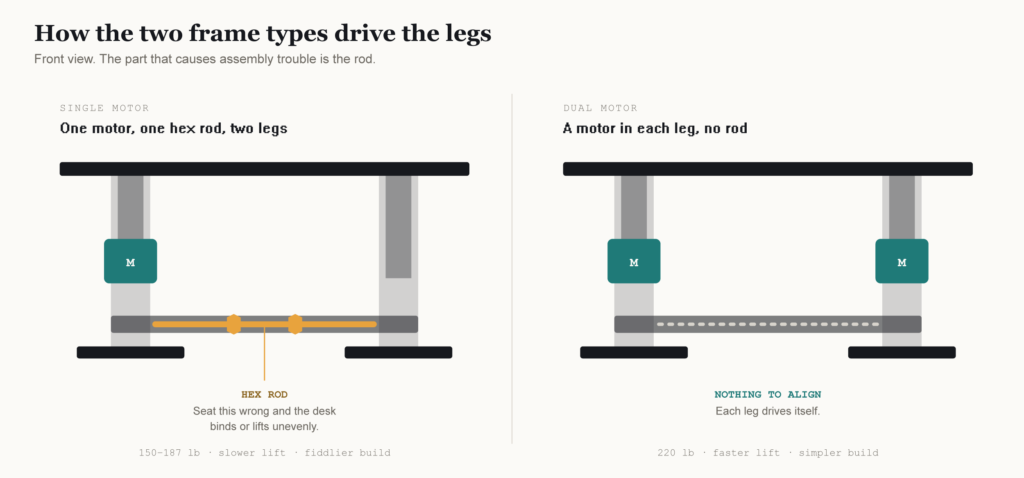
The difference is simple enough. A dual-motor desk has a motor in each leg working in parallel. A single-motor desk has one motor driving one column, with a metal drive shaft, usually called a hex rod, carrying that motion across to the other leg.
That costs you three things, and only one of them will bother most people.
Capacity drops. The single-motor frames here rate at 150 to 187 pounds. The one dual-motor frame, the E6, rates at 220. Lift gets slower and louder under load, which you notice for about a week and then stop noticing.
The one that causes trouble is assembly. You have to seat and align that hex rod, and if it is not properly engaged the desk binds or lifts unevenly on one side. This is not a theoretical risk. It is the single most common complaint owners make about these desks, as the section above sets out. Budget an hour, not twenty minutes, and get someone to hold the frame while you do it.
Does it matter for you? Add up what sits on your desk. A 27-inch monitor on a monitor arm runs about 15 pounds. A mid-tower PC is 25 to 40. Laptop and dock, maybe 8. Most home setups land between 50 and 80 pounds, which is comfortably inside what one motor handles.
Dual motor starts earning its price when you are running two large monitors on a heavy arm, or a tower plus a printer plus the pile of stuff that accumulates on any desk. Short of that, put the money into the frame’s height range instead.
The name trap
Most budget standing desk roundups copy their specs from retailer listings. Retailer listings copy from manufacturer pages. Nobody checks whether the manufacturer agrees with itself.
I did. FlexiSpot does not, and untangling it took longer than any other part of this article. There are three live URLs on flexispot.com right now where the web address names one model and the page describes a different one, including an abandoned page for a discontinued desk still sitting at an address that says E2. The EN1’s own spec tab prints its height range twice and the two figures disagree by almost exactly one inch at both ends, which is the thickness of the laminate desktop. One figure is the bare frame and the other is the frame with a top on it, and FlexiSpot never says which is which. The live E2 page even carries a meta description advertising dual motor stabilisation for a desk that is single-motor.
None of this is exotic. It is the first thing you hit if you check a spec at source. But almost nobody does, which is why a 154-pound capacity figure that belongs to a discontinued E1 Pro is still circulating in roundups published this year. The full teardown of FlexiSpot’s model naming, with every mismatched URL and duplicate spec documented, is in my FlexiSpot EC1 vs EN1 guide.
Two findings from that work change what you should buy, so they stay here.
The EC1 and the EN1 are the same desk
If you have been going back and forth between these two, stop. You are not choosing between two desks. You are choosing between two keypads.
Both product pages carry word-for-word identical copy about a powerful motor and two-stage legs. Same frame, same 154-pound rating in FlexiSpot’s buyer’s guide, same warranty split of five years on frame and motor, two years on the controller and electronics. Work While Walking, one of the few sites that puts hands on these desks, spells it out: the EC1 has a basic up and down controller, and the EN1 costs roughly $50 more for memory presets and a standing reminder. Tom’s Guide reached the same conclusion after building both.
So which should you buy? One question decides it. Will you switch positions several times a day, or will you find one standing height and one sitting height and leave it there? Switching often, take the EN1. Holding a button for fifteen seconds every time gets old faster than you expect. Set it and forget it, take the EC1 and put the $50 toward a monitor arm. What you should not do is pay extra believing you are getting a sturdier desk.
The capacity numbers do not agree either
Two of these desks have two published capacities, and in both cases the higher number is on the listing you would buy from.
The E2 is rated 187 pounds on the live Essential Standing Desk page and 154 pounds on the abandoned E1 Pro page. The desk you can order today holds 187, and FlexiSpot’s spec sheet adds a detail no roundup mentions: that figure includes the hooks, which are themselves rated for 11 pounds. So the desktop carries 176, and that single line probably explains the 176-pound figure floating around on retailer listings.
The EN1 is rated 154 pounds, and its spec sheet notes this excludes the weight of the desktop itself. Amazon listings advertise 176 in the title. Plan against 154.
The Vari Essential does not have the best warranty here
One roundup that gets shared a lot recommends the Vari Essential for having the best warranty in the category. That is the wrong reason to buy it.
Vari covers it for three years, the shortest here. FlexiSpot covers frame and motor for five across the E2, EN1, EC1 and E6. The confusion is understandable, because Vari markets an industry-best lifetime warranty on its most popular electric standing desks. The Essential line is the exception to that policy. Vari’s own comparison table makes the point better than I can. Line the Essential up against the ComfortEdge 40×26, the Ergo 54×26 and the ComfortEdge 48×30 and the warranty row reads: three year, lifetime, lifetime, lifetime. The certification row tells the same story. The Essential carries ANSI/BIFMA. The other three carry ANSI/BIFMA plus GreenGuard, GreenGuard Gold and a UL 962 listing.
The Vari does have a real advantage the roundups miss. Its published spec sheet states the desk is tested to BIFMA standards. None of the FlexiSpot or Fezibo listings I checked make that claim. BIFMA testing means repeated load cycles against an independent standard rather than whatever the factory decided was good enough, and at this price that is rare.
Buy it for that. Not for the warranty card.
Buy the listing, not the model name
Everything above points the same direction. Capacity, height range and preset count belong to the specific version you order, not to the model name printed on it.
Fezibo shows this most clearly, and it is the reason I am not recommending one. There is no single Fezibo 55-inch standing desk. At that width I found at least four distinct products, with capacities running from 176 to 221 pounds and maximum heights varying by more than an inch. If you are tall enough that 45.5 inches is marginal, the difference between two of them decides whether you can stand at your desk at all. The warranty is worse. One Wayfair listing advertises a twenty-year full desk warranty. Fezibo’s own product page lists a sixty-day money-back guarantee and nothing else. I could not work out which applies to which version, and neither could you from the listings.
That is not a knock on the desks themselves. Some of them are probably fine. It is a knock on being asked to buy something you cannot pin down. If you do go for one, screenshot the listing’s stated capacity, height range and warranty before you order, because you may need to point at them later.
FlexiSpot does the same with keypads. The EN1 ships with a basic two-button keypad or an advanced one carrying three presets. The E2 appears with a simple up and down switch in some markets and four presets in others.
I have listed the exact version I vetted for every desk below. Check it against the one in your cart before you order.
FlexiSpot,
decoded
Seven model names. Four frames. Three desks you can buy.
VERIFIED 21 JULY 2026
| Model | Motors | Stages | Capacity | Presets |
|---|---|---|---|---|
| EN1The EC1’s frame, plus a keypad | 1 | 2 | 154 lb | 3 |
| E2 EssentialCheapest one worth buying | 1 | 2 | 187 lb | 4 |
| E6Goes down to 23.6″ | 2 | 3 | 220 lb | 4 |
| EC1 · E1 Pro · E5 · E5 LiteAll off shelf. Still on live URLs. | — | — | — | — |
The one that catches people
Reading an EC1 review?
That desk is gone.
Delisted in 2026. Same frame as the EN1.
Old roundups still recommend it.
If a listing sells one, check what you get.
Buy the EN1 instead. Same frame, keypad included.
What you cannot fix later
Most of what you dislike about a cheap standing desk is fixable. The desktop is the obvious one. If the chipboard surface annoys you in a year, buy a slab of butcher block and bolt it to the same frame for less than the desk cost. Cable management, a monitor arm, a decent mat, all of that comes later and none of it requires you to make the right call today.
Four things do not work that way.
Leg stages. You cannot add a third telescoping section to a two-stage column. This is welded, sealed hardware. If the desk bottoms out at 29 inches and you needed 25, that is permanent.
Motor count. Same story. The frame is built around one drive configuration.
Height range. Follows directly from the first two.
Frame capacity. A 150-pound rating does not go up because you swapped the top.
So the buying logic inverts from what most roundups imply. They spend their word count on desktop material and finish colours, which are the reversible parts, and skim the frame, which is the part you are stuck with.
A move worth considering. FlexiSpot sells most of these frames without a desktop. The E6 frame on its own runs about $189 to $200, against roughly $290 for the complete desk. If you have a decent flat surface already, or you are handy enough to cut and finish one, buying frame-only gets you three-stage legs and dual motors for less than most single-motor complete desks. From what I can tell that is the single best value play in this whole price band, and almost nobody writes about it because a bare frame does not photograph well in a roundup.
Buy the frame you cannot change. Fix the rest when it bothers you.
The picks
Prices below move constantly. FlexiSpot discounts on these have run anywhere from 24 to 62 percent, so treat every figure as a checkpoint rather than a quote. All specs and prices verified July 18, 2026.
FlexiSpot E6: the one to buy if you can
Dual motors, three-stage legs, 220-pound capacity, 23.6 to 48.8 inches. Four presets. Five years on frame and motor, two on the control panel and electronics. Under 50 dB. FSC-certified tops.
That 23.6-inch minimum is the number that matters. Seated, it puts the surface about three inches below the Vari and more than four below the other FlexiSpot desks here, and it is the only desk in this group that properly fits a shorter user seated.
Here is the part that should change your shortlist. Complete E6 desks in 48×24 and 55×28 sit around $275 to $300. The Vari Essential lists at $399.99 and has sold at $299.99 during promotions. So even against Vari’s best sale price you can have three stages and two motors instead of two stages and one, with 70 more pounds of capacity and five more inches of travel.
The frame on its own runs about $189 to $200. If you already have a desktop, or you are willing to buy a slab, that is the cheapest route to a three-stage dual-motor base anywhere in this comparison.
Who it fits. Almost anyone, honestly. Especially if you are under 5’6″, over 6’0″, or running dual monitors on a heavy arm.
The catch. It ships in two boxes rather than one, so assembly takes longer than the single-box budget desks. Bamboo and solid wood versions climb past $350, and the E6 MAX line runs $400 to $670. Stay on the standard E6 and it is a budget desk.
A note on the warranty. Some roundups credit this frame with 10 years. Two different products explain where that came from. The discontinued E5 Lite advertised 10 years in its comparison table, and the E6 MAX, a heavier 330-pound model that costs $400 to $670, carries a genuine 10-year guarantee. The standard E6 does not. Every live listing says five years on frame and motor, two on the control panel and electronics, the same as the E2 and EN1.
FlexiSpot E6
Three-stage, dual-motor. The one to buy if you can.
- Dual motor
- 3-stage
- 220 lb
- 23.6″–48.8″
- 4 presets
- 5-yr frame
FlexiSpot E2 (Essential): the cheapest one worth buying
Single motor, two-stage legs, 187-pound capacity, 28.1 to 45.7 inches of frame travel on the 42-inch model. Four preset buttons, five-year warranty, and a one-piece desktop rather than the spliced surfaces you get on wider budget desks.
The 187-pound rating is the highest of any single-motor desk here, and the feet measure 26.8 inches, which is wider than most in this class and does real work for stability. FlexiSpot rates it for eleven years at five adjustments a day.
Who it fits. Anyone between roughly 5’6″ and 6’0″ running a normal setup, who wants to spend as little as possible. Monitor, laptop, dock, the usual clutter. You are nowhere near the weight ceiling and the height range covers you. It is roughly a hundred dollars cheaper than the E6, ships in one box, and comes with a one-piece top rather than a spliced surface.
The catch. Reviews quoting 154 pounds for this desk were written from FlexiSpot’s abandoned E1 Pro page. See the name trap above.
FlexiSpot E2 (Essential)
The cheapest one worth buying.
- Single motor
- 2-stage
- 187 lb
- 28.1″–45.7″
- 4 presets
- One-piece top
FlexiSpot EN1: the preset upgrade
Same single motor, same two-stage frame. 154-pound capacity, 27.9 to 47.6 inches of frame travel, three memory presets, a 90-minute sit-stand reminder, and noise under 50 dB. Five years on frame and motor, two on the electronics. Taller maximum height than the E2, lower capacity.
Who it fits. Someone who will genuinely switch positions several times a day. The presets are the difference between a desk you adjust and a desk you quietly stop adjusting.
The catch. The 55-inch version is marked Off Shelf on FlexiSpot’s own site. If a listing is still selling you one, check what you are getting.
FlexiSpot EN1
The EC1 plus a memory keypad, about $50 more.
- Single motor
- 2-stage
- 154 lb
- 27.9″–47.6″
- 3 presets
- 5-yr frame
Vari Essential 48×24: the tested one
Single motor, two-stage, 150-pound capacity, 27.5 to 47.2 inches of desk surface height, four presets with an LED display, T-style legs, 0.75-inch two-piece laminate top. Three-year warranty, ANSI/BIFMA certified.
Who it fits. You would rather have a desk validated against a published standard than a longer warranty card.
The catch. Capacity is the lowest in the group and the desktop comes in two pieces. Vari lists at $399.99 and discounts to $299.99 during promotions, so whether it belongs in a budget comparison depends entirely on when you shop. At Vari’s full price the E6 gives you dual motors, three stages, 70 more pounds of capacity and five more inches of travel for less.
Vari Essential 48×24
The one tested to a published BIFMA standard.
- Single motor
- 2-stage
- 150 lb
- 27.5″–47.2″
- BIFMA tested
- 3-yr warranty
What these actually cost right now
Prices checked July 18, 2026. Treat everything below as a starting point rather than a quote.
Discounts on these desks are aggressive and constant. Across the listings I pulled, FlexiSpot markdowns ran from 24 percent to 62 percent off list within a single week. A desk that is a clear winner at $130 is a different proposition at $290, and both prices are real depending on the day.
Three things worth knowing before you shop.
Frame-only pricing is not the same as desk pricing. The E6 shows up at roughly $199 and at roughly $275, and both numbers are accurate. The lower one is the bare frame with no desktop. If a comparison does not say which it is quoting, assume the cheaper one and check.
Sale prices expire and roundups do not update. Vari lists the Essential at $399.99 and discounts it to $299.99 during promotions. Its summer sale ran to July 21, 2026. Any article recommending it as a sub-$300 desk after that date is quoting a price that no longer exists.
The cheapest desk here is cheaper than most roundups say. The EN1 has traded under $150 on promotion. It gets written about as a $250 desk. Set a price alert and wait rather than paying list.
If you are reading this well after the date above, check the current price yourself before trusting any number on any page, including this one.
Before you order
Five questions. Answer all of them from the listing you are buying from, not from a review.
What is the lowest height, and does that figure include the desktop? Manufacturers usually quote frame height. A one-inch top adds an inch. Compare against your seated height, not your standing height.
How many leg stages? Often not stated. Two stages give you roughly 19 inches of travel, three gives you around 25. If the listing does not say and there is no cutaway image, assume two.
How many motors? Check the spec tab, not the marketing copy. FlexiSpot’s E2 spec sheet prints single-motor while the page’s own meta description advertises dual motor. If the assembly instructions mention a hex rod or connecting bar, it is single-motor.
What is the capacity for this exact size? Not the model. The size. Fezibo’s 55-inch desks range from 176 to 221 pounds depending on which one you land on.
What does the warranty cover, and for how long? FlexiSpot splits theirs: five years on frame and motor, two on the controller and electronics. That split tells you something about which part they expect to fail.
If a listing will not answer three of these five, that is a reason to look at a different listing.
Frequently asked questions
Are the FlexiSpot EC1 and EN1 the same desk?
Yes. Same frame, same motor, same 154-pound rating, same warranty. The EN1 costs about $50 more for a keypad with memory presets.
Is a single-motor standing desk worth buying?
For most home setups, yes. Single-motor frames here handle 150 to 187 pounds and a typical monitor, laptop and accessories load comes to 50 to 80. Dual motor earns its price with heavy monitor arms or a full tower.
What is the difference between two-stage and three-stage legs?
The number of telescoping sections per leg. Two stages give roughly 19 inches of travel, three give around 25, and the extra range appears at the bottom, so three-stage frames go lower.
How low does a budget standing desk go?
Most two-stage budget desks bottom out around 28 inches of frame height, which suits people 5’8″ to 6’0″. Three-stage frames reach 23.6 inches. Under about 5’6″, the minimum matters more than the maximum.
How much weight can a budget standing desk hold?
Between 150 and 220 pounds depending on motor count and the exact version you order. Capacity varies by size within one model name, so check the specific listing.
Are cheap standing desks stable at full height?
Two-stage frames run near full extension at standing height, with one overlap point carrying the load. Eureka Ergonomic puts the crossover where three-stage clearly outperforms at 44 to 46 inches. Below that the difference is small, and a wider foot spread helps more than frame material does.
