Steelcase Leap V2 Review: The Back-Pain Pick You Have to Dial In
FlowDeskLab uses affiliate links. If you buy through one I may earn a commission, at no extra cost to you. I did not sit in this chair for a paid placement.
The Leap V2 is the chair reviewers hand the back-pain crown to. It’s also one of the most sent-back chairs in its class. The same part causes both, and nobody selling it to you wants to slow down on that.
That part is the lumbar. Set right, it’s why people call this the chair that fixed their lower back. Left at the factory setting, it jabs, and the chair goes back in the box. This review is about getting you to the first outcome and not the second.
What “researched not tested” actually means here. I did not sit in this for a sponsor. I read the Steelcase spec sheet, the teardowns and refurbisher listings at BTOD and Crandall, the hands-on tester panels at Forbes Vetted and CNN Underscored, the Wirecutter rankings, the certified data, and a couple thousand owner reviews. Then I put the numbers that actually decide the buy in one place: the fit ranges, the real price, the one part that fails, and the fix. You get to decide without buying first.
One ask before we start. If you already own a Leap, drop the firmness setting that worked for your back in the comments. Every one of those helps the next person deciding, and it’s the kind of thing the manufacturer pages will never tell you.
The two knobs that decide everything
Almost every chair gives you a fixed lumbar curve and hopes it lands where your back needs it. The Leap gives you two separate controls, and understanding them is the difference between a chair that saves your back and one you return in week two.
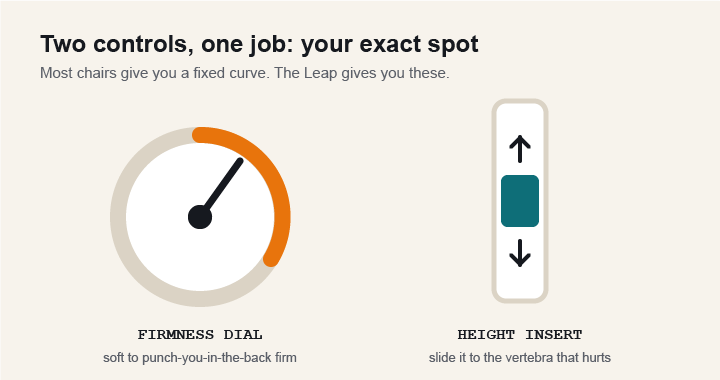
The firmness dial sits on the right side of the seat. Crank it and the lower back pushes into you hard. Back it off and the support goes gentle. The height-adjustable insert slides up and down so support meets the exact vertebra that hurts, not two inches off. Owners who love this chair almost always set both. Owners who return it almost always left them at the factory setting and blamed the chair.
One fact the listings hide: that insert is a separate part. If you buy a refurb that shipped without it, a Steelcase insert runs about $41. Worth knowing so an incomplete listing doesn’t read as a defect, and so you can price it in.
Steelcase Leap V2: the honest scorecard
What it nails
- Two-axis lumbar you can tune to your body
- LiveBack changes shape between upright and reclined
- 4-way arms: height, width, depth, pivot
- 400 lb rated, modular, cheap to keep alive for decades
- The deepest reputable refurbished market of any office chair
The honest caveats
- Lumbar is aggressive out of the box, the top return reason
- Seat is firm on purpose, one to two weeks to settle
- Headrest was an afterthought and feels like one
- Recline holds you in place, it does not rock freely
- New price is high enough that neutral panels pick cheaper chairs
A genuine top-tier chair for lower-back support, held back only by an out-of-box lumbar setting most people never touch and a new price that only makes sense refurbished. Dial it in, buy it used, and it earns the grade.
Does the Leap actually fit your body?
Most reviews skip the numbers that decide this. Here they are, from the spec sheet and confirmed against refurbisher listings.
| Measurement | Range |
|---|---|
| Seat width | 19.25″ |
| Seat depth | 15.75″ |
| Seat height | 16″ – 20.5″ |
| Backrest | 18″W × 25″H |
| Armrest height | 7″ – 11″ |
| Armrest width gap | 12.75″ – 20″ |
| Overall footprint | 24.75″D × 27″W × 38.5″–43.5″H |
| Weight rating | 400 lb |
What the numbers mean in practice: the seat-height range covers most desks from a 5’2″ frame to about 6’5″. The 15.75″ seat depth plus depth adjustment is why long-femur sitters stay comfortable where a fixed-depth chair cuts into the back of the knee. Forbes Vetted’s tester panel ran 5’2″ to 6’2″ and every one of them scored the Leap 8 or higher across build, comfort, and support, which tracks with that range. If you’re over roughly 6’3″, or you need a headrest, size to the Steelcase Gesture instead.
Not sure you fit? Drop your height and desk height in the comments and I’ll point you to the config that works.
What the Leap gets right
LiveBack. The backrest changes shape as you move, so your lower spine stays supported when you sit up and your upper back gets more support as you recline. This is the real mechanism, not a slogan. Steelcase’s own year-long study claims a 17.8% productivity increase, which is their number and not an independent one, so read it as a manufacturer claim.
4-way arms. Height, width, depth, pivot, with the ranges in the table above. In the Forbes panel the Leap was the only chair to score 8 or higher across build quality, comfort, and support, with no squeak, creak, or wobble anywhere in the frame.
Natural Glide seat. The seat glides forward as you recline so you stay close to your screen instead of drifting away from your work. It’s also the reason the Leap holds you in position rather than rocking, which matters below.
Build and certs. Rated to 400 lb, backed by a 12-year 24/7 warranty, BIFMA and GREENGUARD certified. These chairs come back to refurbishers from 2006 still working, which is the whole basis of the used market.
The one part that fails, and the free fix
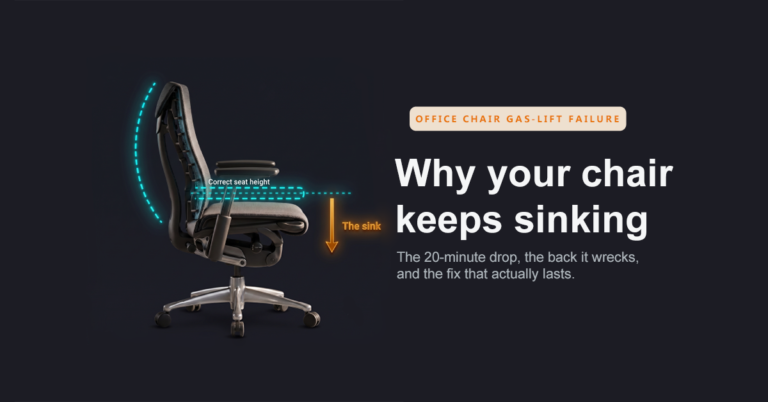
Search long enough and you find the Leap’s single recurring complaint: it starts to sink. On units built before January 19, 2009 with the top-activated cylinder, this is almost never a dead cylinder. It’s a set screw on the seat mechanism that drifts out of alignment and overactivates the trigger, so a small shift in your weight drops the chair.
The fix, no part, no cost: slide the seat forward to expose the top of the cylinder, find the set screw on top, and loosen it a quarter turn at a time, testing the lever between turns, until the pin only touches the trigger when you actually pull the handle.
That modularity is the real durability story. Refurbishers keep 20-year-old Leaps running by swapping the cylinder or casters, both cheap and close to universal. A Leap people call dead almost never is.
What it actually costs to own
New, in the config worth owning, meaning 4-way arms and the adjustable lumbar, the Leap runs about $1,399, and fully loaded it climbs toward $2,000. At that price a neutral panel can love the chair and still not choose it. CNN Underscored tested 18 chairs, loved the Leap, and ranked the cheaper Steelcase Series 1 above it. Their only real knock was the price.
The move the authority pages bury is the refurbished market. Corporations decommission Leaps by the thousand, specialists rebuild them, and the same frame with the same 12-year warranty sells for roughly half.
| Option | Price | Warranty | Return window |
|---|---|---|---|
| New (Steelcase) | ~$1,399 | 12 yr, 24/7 | 14 days |
| Refurb (Crandall) | $729 | 12 yr | 30 days |
| Refurb (BTOD) | ~$641 | 12 yr | 30 days |
| Amazon “renewed” | skip | mystery | mystery |
Here’s the part no one computes. Spread the price across the 12-year warranty and you get what the frame costs you per covered year.
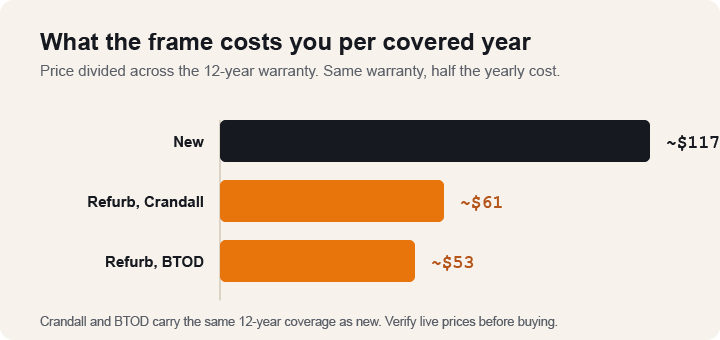
Refurbished from Crandall or BTOD carries the same 12-year coverage as new for a little over half the yearly cost. Even if your refurb needs the $41 lumbar insert added, it still lands more than $600 under new. Reputable refurbished is not Amazon “renewed,” though. BTOD bought the cheapest renewed Leap on Amazon and it arrived a 2007 chair with stained fabric and a mildew smell. Buy from a remanufacturer that publishes what they replaced.
The honest knocks
The knocks are why a reader trusts the rest of the page, so here they are without softening.
The lumbar can jab. Aggressive out of the box and the top reason people return the chair. If it feels like it’s punching your spine, drop the tension on the dial first. If that’s not enough, peel back the upholstery and pop the plastic insert out. You keep the backrest’s natural curve and lose the aggression. Two minutes, no tools, no return.
The seat is firm. Steelcase, Herman Miller, and Haworth all build firm seats on purpose, citing research that firm holds up better over a full day. Owners report one to two weeks of break-in soreness before it settles. If you want a plush, sink-in seat, this is the wrong chair.
The headrest is an afterthought. The Leap wasn’t designed with one. Bolt-on headrests cost extra, feel cheap, and stiffen the backrest’s flex. If a headrest is non-negotiable, buy the Steelcase Gesture, designed with one from the start.
It holds you, it doesn’t rock. The recline has intentional sticking points that keep you in position. Some people want exactly that. If you want to lean back and rock freely, the Aeron or the Embody will suit you better.
Leap V2 vs Herman Miller Aeron
This is the comparison most Leap shoppers are actually running. The fork is mesh-and-rock versus padded-and-held.
| Leap V2 | Aeron | |
|---|---|---|
| Weight rating | 400 lb | 350 lb |
| Seat | Padded, depth-adjustable | Mesh, fixed depth |
| Lumbar | Firmness dial + height insert | PostureFit pad, no firmness dial |
| Recline | Held in position | Free rock |
| Runs warm? | Warmer, padded | Cooler, mesh |
| Price, comparably loaded | ~$1,399 | ~$1,800 |
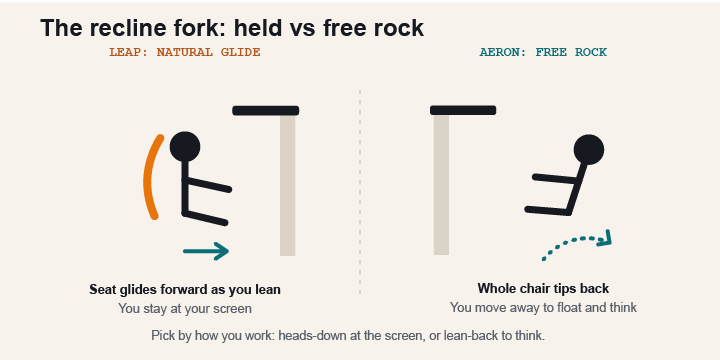
If you run hot or lean back and float, the Aeron wins. If lower-back precision and a depth-adjustable seat matter more, the Leap wins, and it’s the cheaper of the two loaded. Wirecutter’s own chair finder is worth noting here: it lists the Gesture, the Aeron, the Sayl, even the budget HON Ignition, and doesn’t rank the Leap at all. Their pick for most people has been the Gesture since 2015. I read that as an honest signal, not a knock: the Leap is excellent and not magic.
Leap V2 vs Haworth Fern
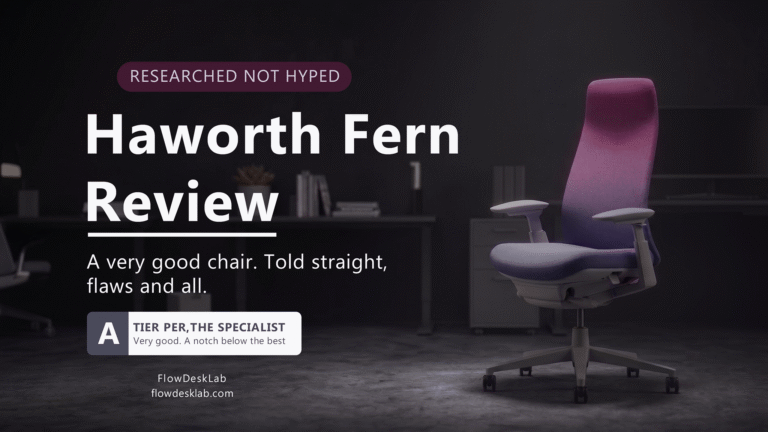
I reviewed the Fern already, and it’s a very good chair told straight. Short version: the Fern’s digital-knit back and softer give suit people who want flex and airflow. The Leap’s edge is the two-axis lumbar and the deep refurbished market. If lower-back control is the entire reason you’re buying, the Leap has more of it. Read the full Haworth Fern review if you’re deciding between the two.
Where the sources disagree, and what I did about it
Three numbers move around depending on where you look, so you’re not caught out at checkout.
Price. MSRP gets quoted anywhere from about $998 for a stripped config to $1,299 to $1,399 for the one worth owning. I used the higher figure because the cheaper ones drop the adjustable lumbar or the 4-way arms, which are the point of the chair. Pull the live number before you buy.
Weight rating. You’ll see both 300 lb and 400 lb. 400 is the structural rating on the standard Leap; 300 shows up as a comfort-fit guide in some listings; Leap Plus goes to 500. If you’re near either line, confirm on the exact listing.
Returns. Steelcase quietly cut new-chair returns from 30 days to 14 and changed warranty terms outside North America. A refurbisher’s 30-day window is now longer than Steelcase’s own, which flips the usual assumption that new is the safer buy.
Is the Steelcase Leap V2 right for you?
Buy it if: you sit six or more hours a day, your lower back is the problem you’re solving, you want to set support precisely instead of hoping a fixed curve fits, and you’ll buy refurbished to make the price make sense.
Look elsewhere if: you need a headrest (Gesture), you want to rock freely or run hot (Aeron), you want a soft plush seat (this one is firm by design), or you’re over 6’3″ and haven’t checked the fit range.
The verdict
The Leap V2 earns its back-pain reputation, with one honest condition: you have to dial the lumbar to your body, and sometimes that means taking part of it out. Do that, buy it refurbished from a real remanufacturer, and you get one of the most supportive chairs made for roughly half its new price, on the same 12-year warranty. Pay full freight for the new chair and the math gets harder, which is why even reviewers who love it don’t always pick it.
My pick: refurbished Leap V2, adjustable lumbar, 4-way arms.
Refurbished Steelcase Leap V2 – the version most people should buy
New Steelcase Leap V2 – if you want full warranty and don’t mind the price
Herman Miller Aeron – if you want mesh and a free-rocking recline instead
Bought one after reading this? Come back and tell me which config and which lumbar setting worked for your back. It’s the most useful thing on this page for the next person, and I read every one.
Frequently asked questions
Is the Steelcase Leap V2 worth it in 2026?
Refurbished, yes, clearly, at roughly $61 per covered year against new’s $117. New at full price, only if budget isn’t the deciding factor. The deep refurbished market is why this chair stays a top recommendation years after release.
Does the Leap V2 actually help back pain?
For most people, yes, because you can tune the lumbar firmness and slide its height to your exact trouble spot. If it feels aggressive, dial it down or remove the insert. The adjustability is the point, not a fixed curve.
Why does my Leap V2 sink, and how do I fix it?
On units built before January 19, 2009 it’s usually not a dead cylinder. It’s a set screw on top of the cylinder that has drifted. Slide the seat forward, loosen the screw a quarter turn at a time, and test until the chair holds. No part, no cost.
Should I buy new or refurbished?
Refurbished from a remanufacturer like Crandall ($729) or BTOD (~$641), both on a 12-year warranty. Avoid Amazon “renewed” listings that don’t say what was replaced.
Does the refurbished Leap include the lumbar insert?
Not always. It’s a separate part, about $41 from Steelcase. Check the listing, and even if you add it, refurbished still beats new by more than $600.
Should I get the headrest?
No. It’s an afterthought on this chair and it stiffens the backrest’s flex. If you need a headrest, buy the Steelcase Gesture.
What is the weight rating and will it fit me?
Rated to 400 lb, with a seat-height range of 16″ to 20.5″ that fits roughly 5’2″ to 6’5″. Leap Plus supports up to 500 lb. Over 6’3″ or needing a headrest, size up to the Gesture.